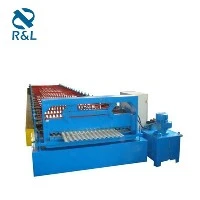
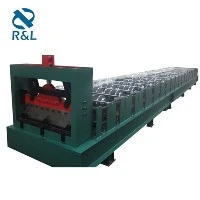
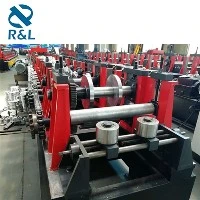
A corrugated forming machine is a vital piece of equipment in the manufacturing industry, especially in the production of corrugated metal sheets widely used for roofing, wall cladding, and packaging. As a trusted corrugated forming machine supplier, we understand that users may encounter various problems during the operation of these machines. In this blog, we will discuss some common problems with corrugated forming machines and provide effective solutions.
Problem 1: Uneven Corrugation
One of the most common issues is the production of uneven corrugations on the formed sheets. This can result in an aesthetically unpleasing appearance and may also affect the structural integrity of the final product.
Causes
- Roller Misalignment: The rollers in the corrugated forming machine play a crucial role in shaping the sheets. If the rollers are not properly aligned, the pressure applied to the sheet will be uneven, leading to irregular corrugations.
- Worn - Out Rollers: Over time, the rollers can wear out due to continuous use. Worn - out rollers may have uneven surfaces, which will transfer these irregularities to the formed sheets.
- Incorrect Feed Speed: If the feed speed of the sheet into the machine is either too fast or too slow, it can cause uneven corrugation. A too - fast feed may not allow the rollers to fully shape the sheet, while a too - slow feed can lead to excessive deformation in some areas.
Solutions
- Check and Adjust Roller Alignment: Regularly inspect the alignment of the rollers. Use precision measuring tools to ensure that the rollers are parallel to each other and properly spaced. Make necessary adjustments according to the machine's manual.
- Replace Worn - Out Rollers: If you notice signs of wear on the rollers, such as grooves or uneven surfaces, it is advisable to replace them promptly. High - quality replacement rollers from reliable sources can ensure consistent performance.
- Optimize Feed Speed: Experiment with different feed speeds to find the optimal setting for your machine and the type of sheet material you are using. Usually, the machine's manual will provide a recommended feed speed range.
Problem 2: Sheet Jamming
Sheet jamming is another frustrating problem that can disrupt the production process and cause damage to the machine.
Causes
- Debris or Foreign Objects: Small pieces of metal shavings, dust, or other foreign objects can accumulate inside the machine and block the path of the sheet.
- Incorrect Sheet Thickness: Using a sheet with a thickness outside the machine's specified range can lead to jamming. Thicker sheets may be too rigid to pass through the rollers smoothly, while thinner sheets may get caught in the gaps.
- Improper Lubrication: Insufficient lubrication of the moving parts can increase friction, causing the sheet to jam as it moves through the machine.
Solutions
- Clean the Machine Regularly: Establish a regular cleaning schedule to remove debris and foreign objects from the machine. Pay special attention to areas around the rollers, guides, and feed mechanisms.
- Check Sheet Thickness: Before starting the production, ensure that the sheet thickness is within the machine's recommended range. Refer to the machine's manual for the appropriate thickness specifications.
- Lubricate Moving Parts: Follow the lubrication guidelines provided in the machine's manual. Use the recommended lubricants and apply them at the specified intervals to reduce friction and prevent jamming.
Problem 3: Poor Edge Quality
The edges of the corrugated sheets may sometimes exhibit problems such as burrs, uneven cuts, or rough edges, which can affect the usability and safety of the product.
Causes
- Dull Cutting Tools: If the cutting tools used to cut the formed sheets are dull, they will not be able to make clean cuts, resulting in rough edges.
- Incorrect Cutting Pressure: Applying too much or too little pressure during the cutting process can cause uneven edges. Excessive pressure may deform the sheet, while insufficient pressure may not cut through the sheet completely.
- Alignment Issues in the Cutting Unit: Similar to the roller alignment, misalignment in the cutting unit can lead to uneven cuts and poor edge quality.
Solutions
- Sharpen or Replace Cutting Tools: Regularly inspect the cutting tools and sharpen them as needed. When the tools are beyond sharpening, replace them with new ones to ensure clean and precise cuts.
- Adjust Cutting Pressure: Use the appropriate equipment to measure and adjust the cutting pressure. Test different pressure settings and select the one that produces the best edge quality.
- Check and Align the Cutting Unit: Ensure that the cutting unit is properly aligned with the sheet path. Make any necessary adjustments to eliminate misalignment and improve edge quality.
Problem 4: Excessive Noise and Vibration
Excessive noise and vibration during the operation of the corrugated forming machine can be a sign of underlying problems and may also indicate potential safety hazards.
Causes
- Loose Machine Components: Bolts, nuts, or other parts of the machine may become loose over time due to continuous vibration. Loose components can cause additional noise and increase the overall vibration.
- Worn - Out Bearings: Bearings are essential for the smooth operation of the machine. Worn - out bearings can cause uneven rotation and generate excessive noise and vibration.
- Incorrect Machine Installation: If the machine is not installed on a stable and level surface, it can lead to increased vibration during operation.
Solutions
- Tighten Loose Components: Regularly inspect the machine for loose parts and tighten them using the appropriate tools. Pay special attention to areas around the rollers, motors, and frames.
- Replace Worn - Out Bearings: If you suspect that the bearings are worn out, replace them immediately. Use high - quality bearings to ensure long - term performance.
- Ensure Proper Machine Installation: Make sure the machine is installed on a flat and stable surface. Follow the installation instructions provided in the machine's manual to minimize vibration.
Problem 5: Electrical Malfunctions
Electrical problems can disrupt the normal operation of the corrugated forming machine and may even pose a safety risk.
Causes
- Faulty Wiring: Over time, the electrical wiring in the machine may deteriorate, become loose, or develop short - circuits. This can lead to a range of electrical problems, such as erratic motor operation or failure of control systems.
- Power Surges: Sudden power surges can damage sensitive electrical components in the machine. These surges can be caused by lightning strikes, utility grid issues, or improper use of electrical equipment.
- Component Failure: Electrical components such as contactors, relays, and sensors can fail due to normal wear and tear or manufacturing defects.
Solutions
- Inspect and Repair Wiring: Regularly check the electrical wiring for signs of damage or wear. If any issues are found, repair or replace the affected wiring. It is recommended to have a qualified electrician perform these tasks.
- Install Surge Protectors: To protect the machine from power surges, install surge protectors at the power source. Surge protectors can divert excess voltage and prevent damage to electrical components.
- Replace Failed Components: When an electrical component fails, replace it with a new one that is compatible with the machine. Refer to the machine's manual or consult the manufacturer for the correct replacement parts.


As a leading supplier of corrugated forming machines, we also offer a wide range of related products, including the Metal Stud Roll Forming Machine, Roof Panel Roll Forming Machine, Corrugated Roof Sheeting Machine, Roof Tile Making Machine, and Roof Tile Machine.
If you are experiencing problems with your corrugated forming machine or are looking to purchase a new one, our team of experts is ready to assist you. We provide high - quality machines, reliable after - sales service, and professional technical support. Contact us to start a discussion about your specific needs and requirements.